CLOUD
Notes from setting up a GitOps deployment pipeline on Amazon Elastic Kubernetes Service using Docker, Kubernetes, CI/CD and ArgoCD.
Deploying an application to Kubernetes becomes much more manageable when infrastructure and application state are declared in Git. Building an AWS EKS workflow with ArgoCD made the benefits of GitOps clear, but it also revealed how much of the real work happens around IAM, networking and observability.
IAM is often harder than Kubernetes itself
Creating Pods and Deployments is straightforward once the Kubernetes basics are in place. The more difficult part is securely giving workloads access to AWS services without embedding long-lived credentials inside containers.
IAM Roles for Service Accounts, commonly known as IRSA, allow a Kubernetes ServiceAccount to assume a specific AWS IAM role. Getting this relationship correct requires careful coordination between cluster identity providers, trust policies, namespaces and service account annotations.
GitOps changes how you think about deployments
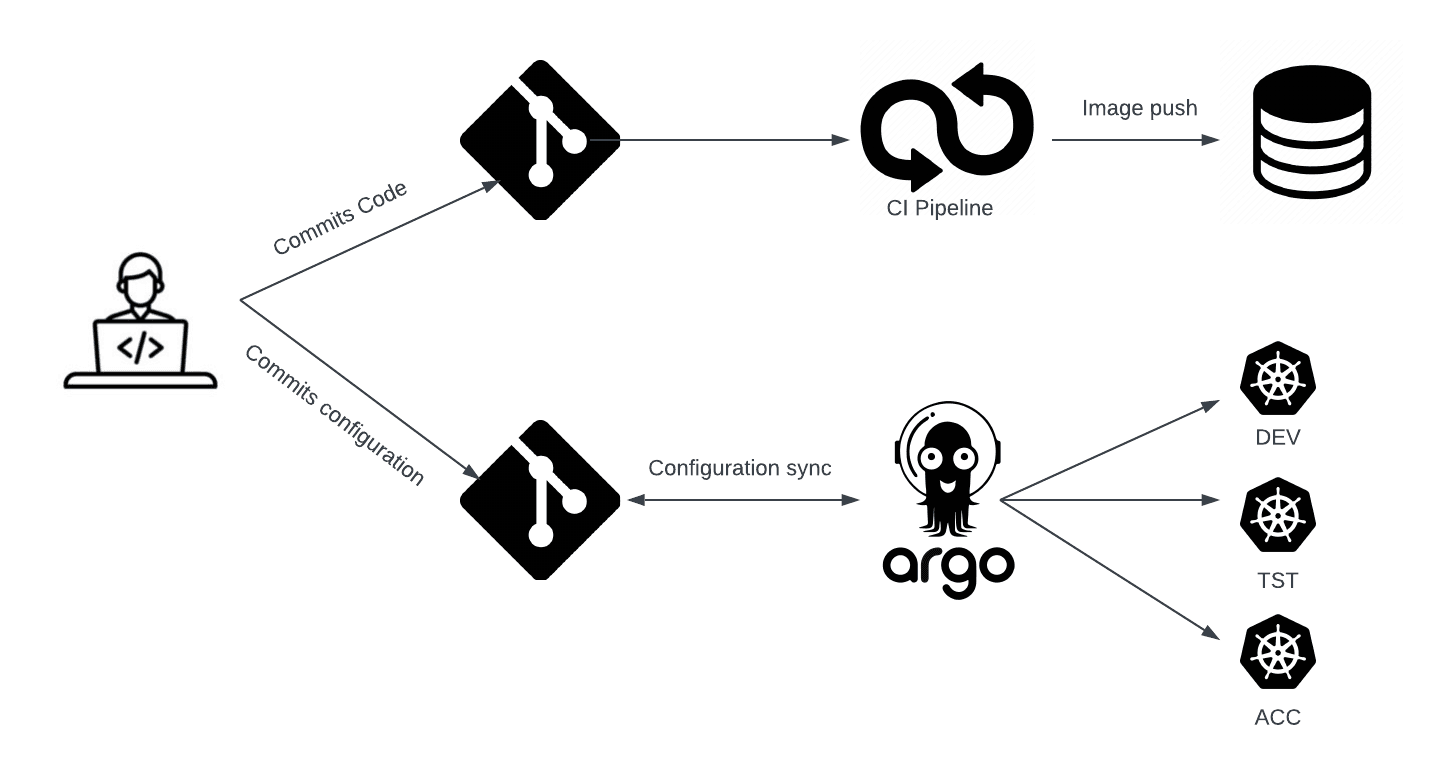
With ArgoCD watching a repository of Kubernetes manifests, deployment is no longer a manual sequence of kubectl commands. A merge updates the desired state in Git, and ArgoCD reconciles the cluster to match.
This creates an auditable deployment history and makes rollback easier because the intended application state is version controlled alongside the source code.
Operational visibility matters
A deployment is not complete just because a manifest was applied. Readiness probes, liveness probes, rollout status, logs and metrics are what make a deployment observable and easier to troubleshoot.
The most useful setup is one where a failed deployment provides enough signals to identify whether the issue is caused by image configuration, application startup, networking, permissions or resource limits.
Enjoyed this article?
Get new posts in your inbox.
Occasional writing about software engineering, AI, security, cloud infrastructure, and the projects I build.
No spam. Unsubscribe whenever you want.
Topics